Blog Post
The Pattern Language of Enterprise Agentic Workflows

Most enterprises I talk to are not short on AI demos. They have seen enough copilots, agent prototypes, and workflow automations to know the technology is real. The harder question is what happens after the demo works. That is where the conversation usually changes. The team starts asking about ownership, governance, cost, failure handling, audit trails, human review, and how many agents are too many agents. In other words, they stop asking whether agentic AI is possible and start asking whether it can be trusted in production. That gap between proof of concept and production is where patterns matter. This post is my attempt to organize the agentic workflow patterns I see becoming useful for enterprise architects and engineering leaders.
Why Autonomy Changes the Architecture Conversation
An agentic workflow is not just a chatbot with tools attached. It is a system where one or more models can plan, decide, call tools, query systems, invoke APIs, or delegate work to other agents to complete a goal. That shift matters because the model is no longer only generating an answer. It is now part of the execution path.
And once an agent can take action, even a small action, the questions change very quickly. Who approved it? Which data did it use? What happens if it calls the wrong tool? Can we replay the decision? Can we stop the workflow halfway through? Can a human override it before it touches a regulated process?
This is the gap I see most often. Teams prove the agent can do the task, but they have not always designed the control points around the task. So the workflow looks impressive in a demo, but becomes hard to trust when it has to run repeatedly across teams, systems, and risk levels. That is where structured patterns help. They give teams a reusable way to place the control points:
- Scalability: Decompose complex tasks across distributed agents without creating spaghetti architectures.
- Governance: Establish predictable control points where compliance, auditing, and human oversight can be enforced.
- Reliability: Define retry, fallback, and escalation behavior because an agent that silently fails in a regulated workflow is worse than no agent at all.
That is why I find patterns useful. They are not academic labels. They are a way to make autonomy understandable, governable, and safe enough to operate. Here are thirteen patterns across six categories that I see becoming useful in production conversations.
Enterprise-Grade Agentic Patterns
| Category | Patterns |
|---|---|
| Control & Flow | |
| Coordination & Decomposition | |
| Quality & Feedback | |
| Tooling & Integration | |
| Memory & State | |
| Human-in-the-Loop |
Control & Flow Patterns: The Foundation
I usually start here because these are the patterns that decide how work moves through the system. Before we talk about memory, tools, or multi-agent debates, the first question is much simpler: does the workflow move in a straight line, branch by intent, or run multiple paths in parallel?
Sequential Pipeline (Chain)
What it is: This is the most straightforward pattern. One step finishes, hands its output to the next step, and the workflow keeps moving in order. It is not fancy, but that is exactly why it is useful.
When to use it: I would use this for document processing, extraction, classification, validation, routing, or any workflow where order and traceability matter more than speed.
Enterprise benefits: It is easy to explain, easy to audit, and easy to put SLAs around because every stage has a clear input and output.
Risks: The diagram looks clean because the happy path is clean. In production, the weakness is that one bad step can poison everything after it. I would not use this without checkpointing, retries, and a clear way to restart from the failed stage instead of replaying the whole chain.
Chain pattern: ordered, auditable handoffs

Dynamic Routing (Router)
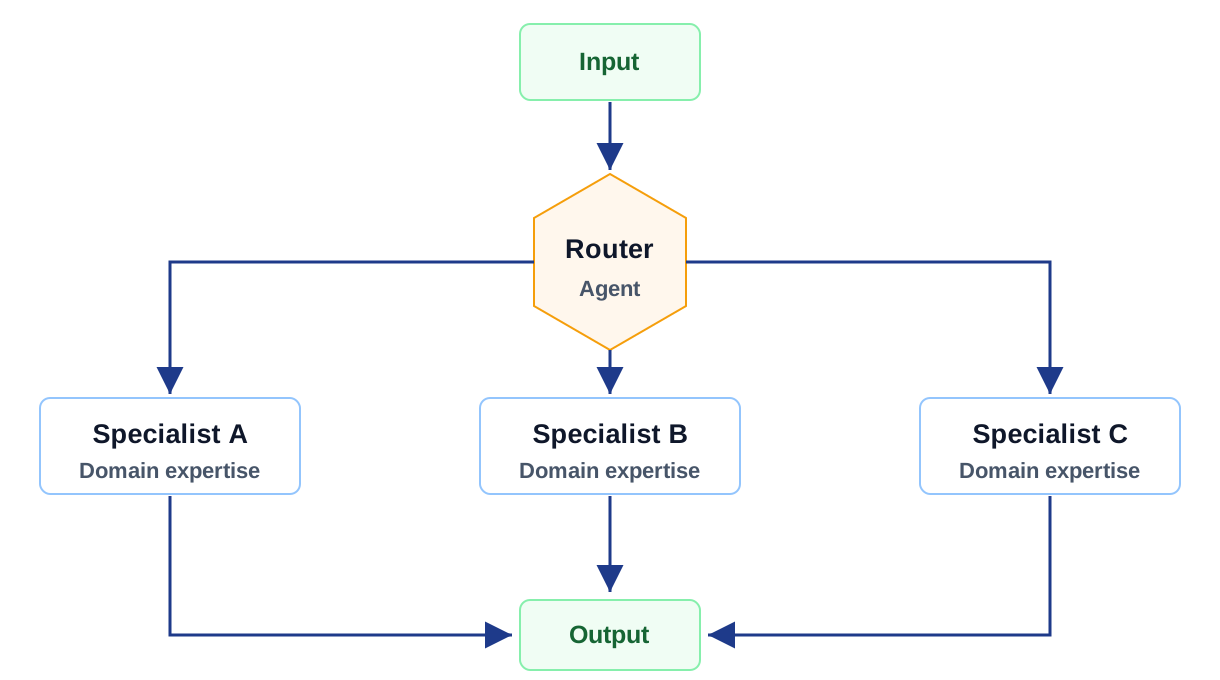
What it is: This is the pattern I reach for when one front door needs to serve multiple kinds of requests. A router looks at the intent and sends the work to the right specialist path.
When to use it: This fits customer support triage, internal copilots, HR or IT help desks, finance questions, legal intake, or any experience where users should not need to know which backend workflow they are talking to.
Enterprise benefits: The value is clean separation. Each specialist can have its own knowledge, tools, policies, and review process without turning the whole agent into one overloaded generalist.
Risks: Misrouting is dangerous because it often looks like a normal answer. The system may not fail loudly; it may just send the user down the wrong path. Routing accuracy needs to be measured like a product metric, not treated as a prompt detail.
Router pattern: classify once, route precisely
Parallel Fan-Out / Fan-In
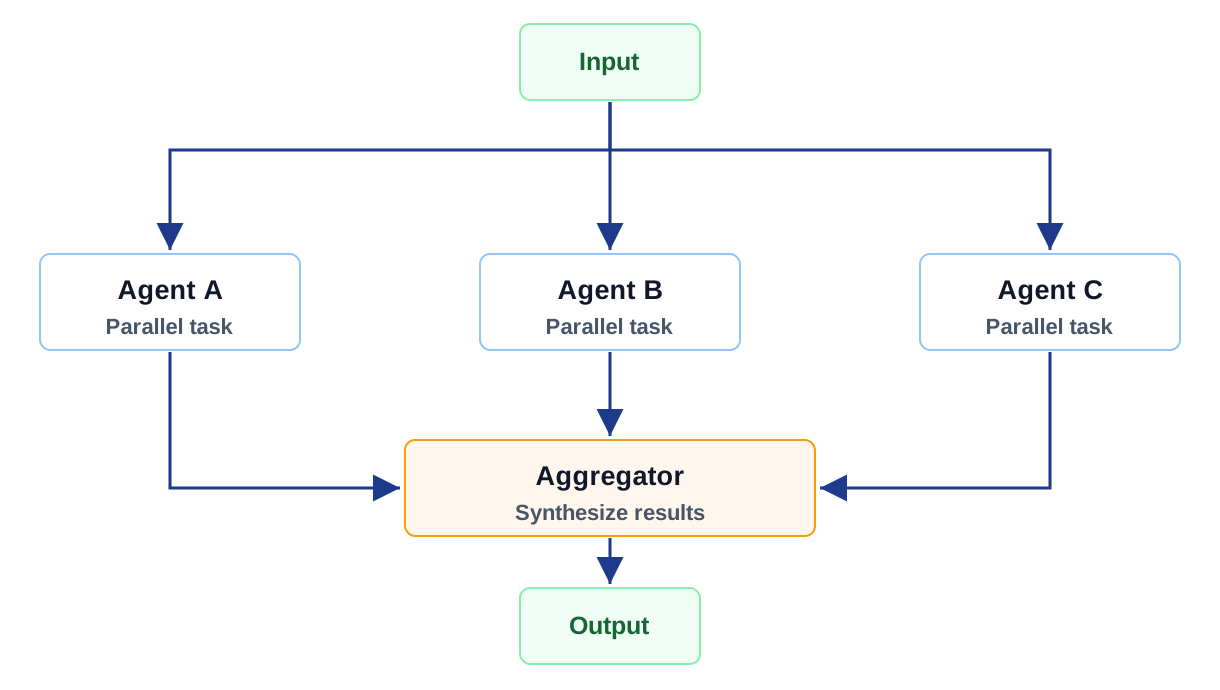
What it is: This pattern splits the work across multiple agents at the same time and then brings the results back together. It is useful when the tasks are truly independent.
When to use it: I would use it for multi-source research, concurrent document review, regulatory comparison, or any scenario where waiting for one agent at a time is unnecessary.
Enterprise benefits: It can reduce wall-clock time and improve coverage because different agents can look at different sources, policies, or perspectives in parallel.
Risks: This is where cost can quietly get out of hand. Five agents running in parallel can look efficient on a demo and expensive in production. The diagram shows aggregation, but the real work is validating that the outputs are consistent enough to combine. I would put budget caps and aggregation checks around this from day one.
Fan-out/fan-in pattern: parallel work, single synthesis
Coordination & Decomposition Patterns: Organizational Mirrors
These patterns are where agentic systems start to look more like teams. One agent may coordinate, another may execute, and another may review. That can be powerful, but only if the responsibilities are explicit.
Orchestrator-Worker (Manager-Executor)
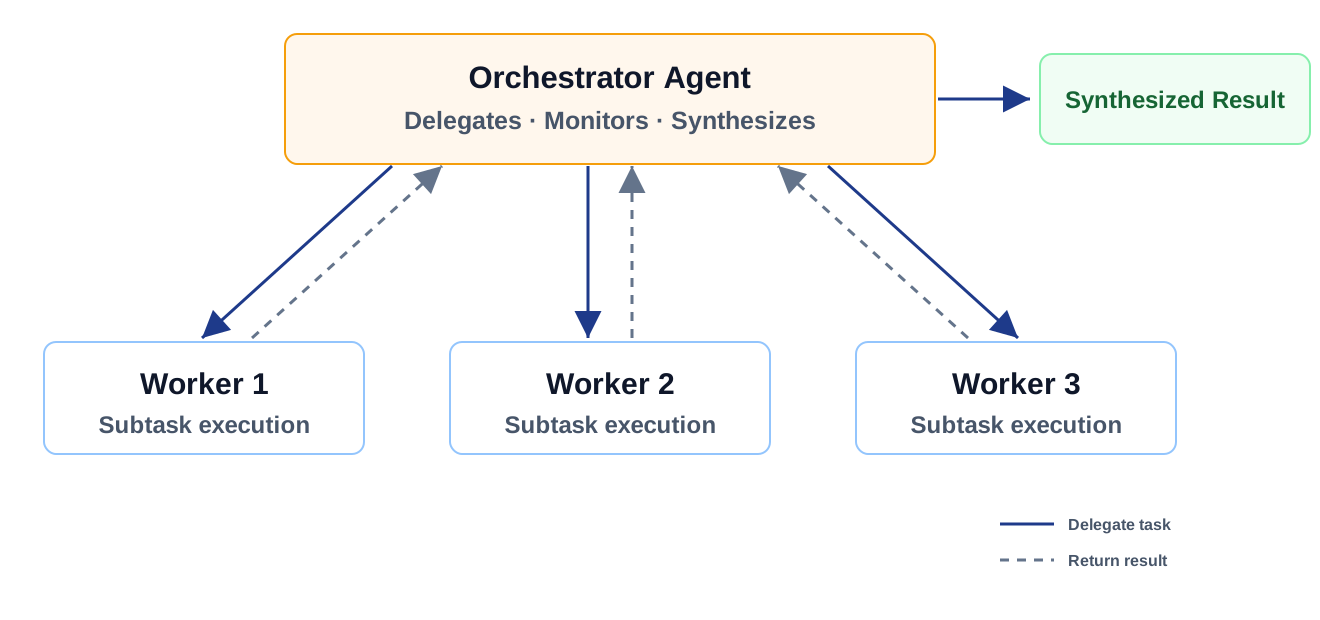
What it is: This is usually the first serious multi-agent pattern teams reach for. One agent owns the plan, breaks the work into smaller pieces, assigns those pieces to worker agents, and then pulls the results back together.
When to use it: I would use this when the workflow is too dynamic for a fixed pipeline, but still needs one place where planning and coordination are owned.
Enterprise benefits: It maps well to how teams already think: a coordinator plus specialists. It also lets you improve or replace worker agents without redesigning the whole workflow.
Risks: The orchestrator can become the bottleneck and the single point of failure. If this pattern is used for anything long-running, I would not rely only on the model context. The plan, state, and intermediate results need to live somewhere durable.
Orchestrator-worker pattern: delegate, monitor, synthesize
Hierarchical Multi-Agent (Tree of Agents)
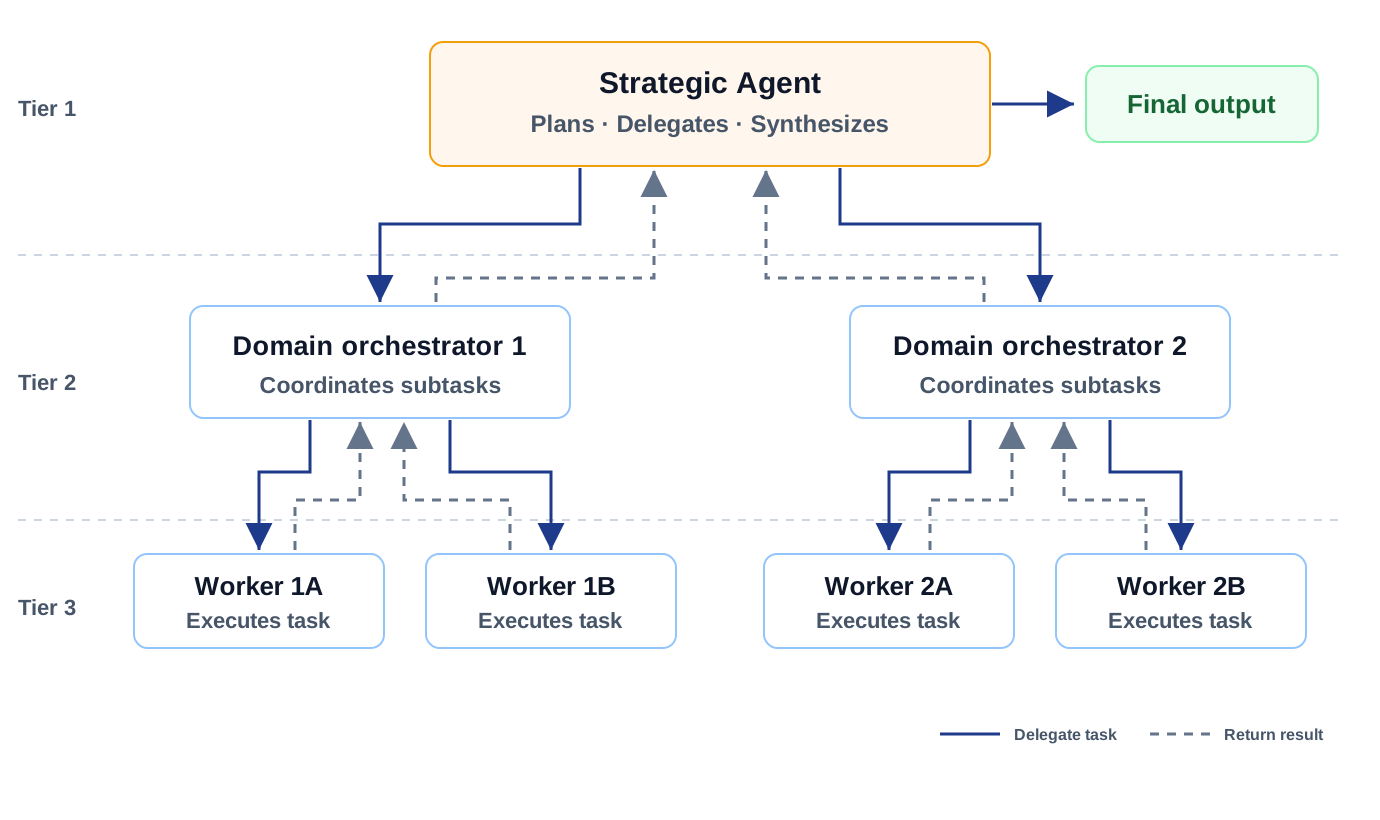
What it is: This is orchestration with layers. A strategic agent coordinates domain-level agents, and those domain agents coordinate their own workers.
When to use it: I only see this making sense when the workflow spans multiple business domains, like supply chain, finance close, enterprise reporting, or large operational processes.
Enterprise benefits: It mirrors the enterprise structure better than a flat set of agents. Each layer can own its domain rules, approvals, and context.
Risks: The cost is complexity. Latency compounds, handoffs multiply, and debugging becomes much harder. The hierarchy may look organized on paper, but if you cannot trace decisions across layers, this pattern will become painful quickly.
Hierarchical pattern: strategic control across domains
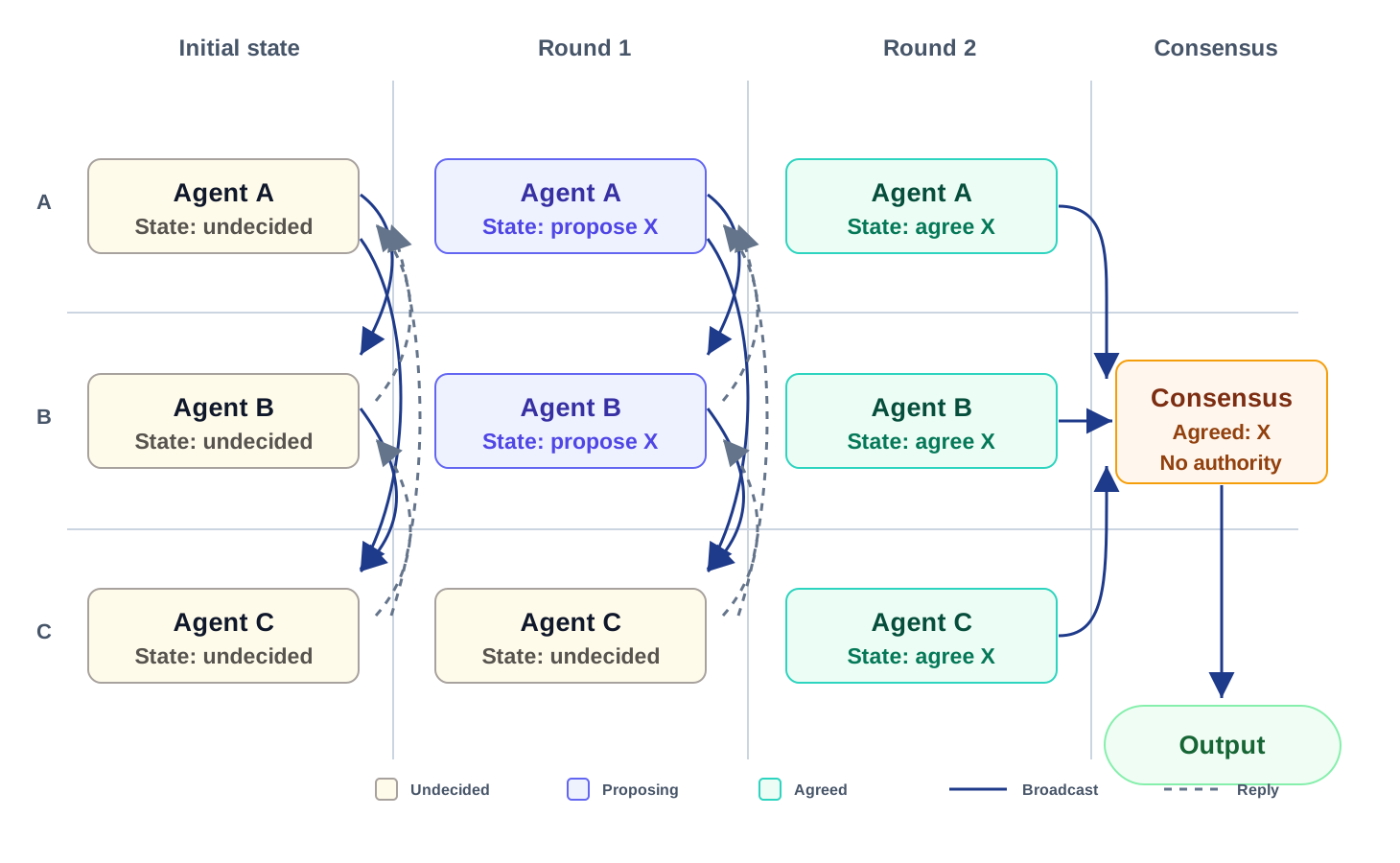
Swarm / Decentralized Collaboration
What it is: This is the least centralized pattern. Agents collaborate with each other directly instead of waiting for one orchestrator to tell everyone what to do.
When to use it: I would keep this for simulation, optimization, research, or resilience-heavy scenarios where central control is more of a limitation than a benefit.
Enterprise benefits: It can be resilient and adaptive because there is no single coordinator that everything depends on.
Risks: Governance is the hard part. The diagram shows the agents reaching agreement, but the real concern is who is accountable when there is no central owner. In most enterprise workflows, unpredictability is not charming; it is a risk. I would use this carefully and usually outside regulated or customer-impacting paths.
Swarm pattern: peer coordination without central control
Quality & Feedback Patterns: Built-In Quality Gates
This is where the architecture starts answering a practical question: who checks the work before it moves forward? With agents, quality cannot be something we inspect only at the end.
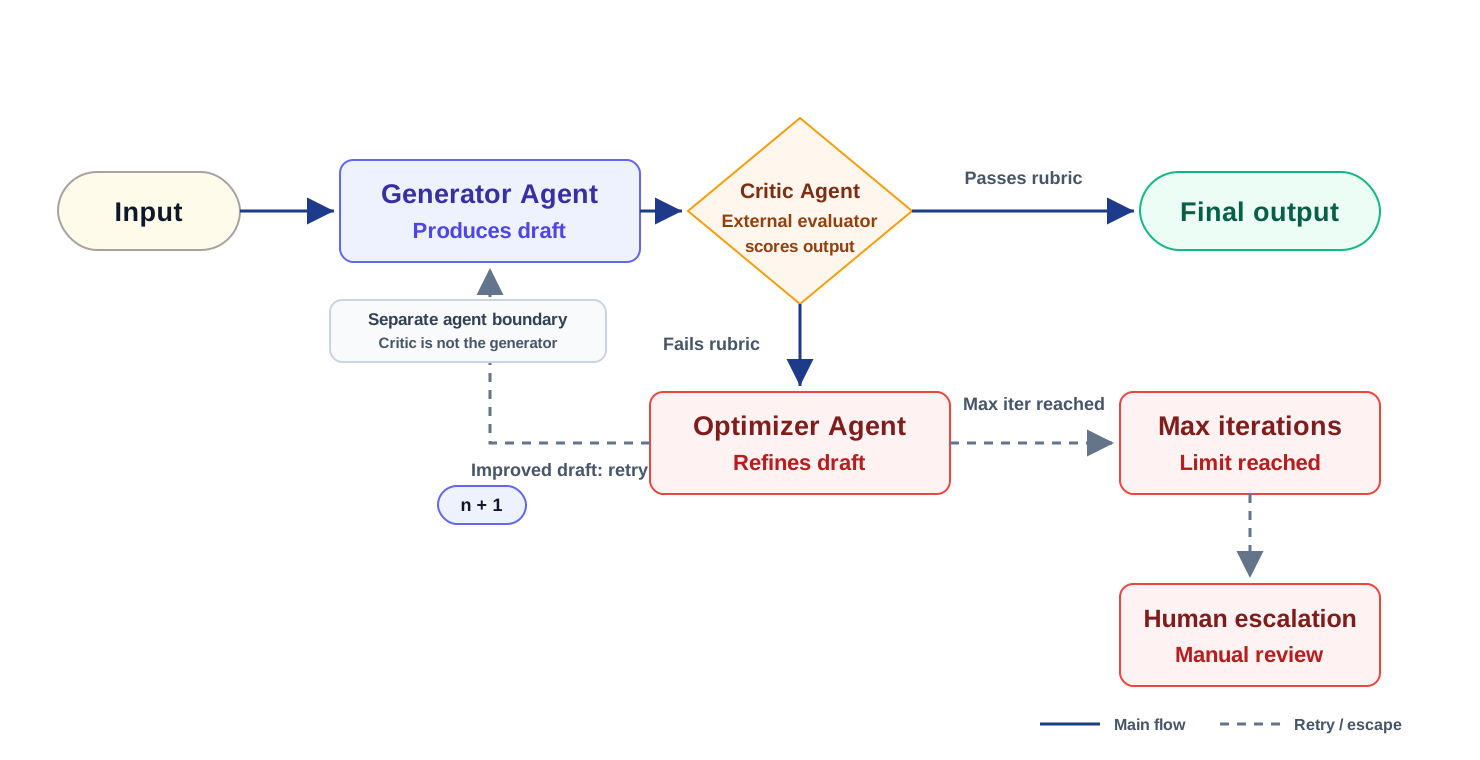
Evaluator-Optimizer (Critic Loop)
What it is: One agent produces the work, and another agent checks it against a rubric. If it does not meet the bar, the output goes back for improvement.
When to use it: This works well when quality can be expressed as criteria: compliance language, report quality, code review checks, policy alignment, or tone and completeness.
Enterprise benefits: It gives teams a repeatable quality gate instead of relying on the first answer the model produces.
Risks: Loops need limits. Without a hard stop, the system can burn time and tokens trying to perfect something that should have been escalated.
Critic loop: external evaluation before approval
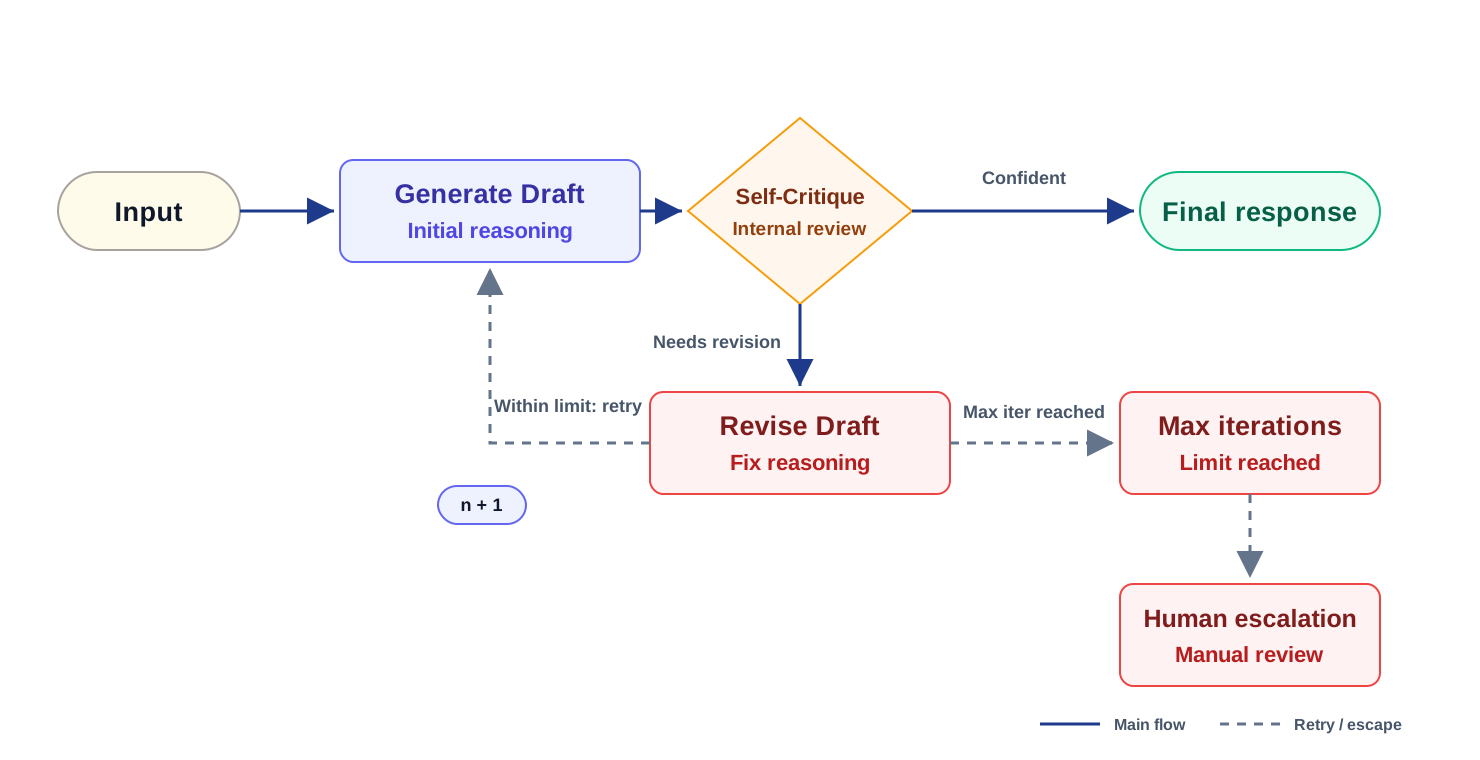
Reflection / Self-Improvement Loop
What it is: The same agent pauses to review its own answer before sending it forward. It is a lighter-weight check than using a separate evaluator.
When to use it: I would use this for reasoning-heavy work where the first draft often has small gaps, but the risk level does not justify a full external critic.
Enterprise benefits: It can catch obvious misses without adding another agent to the workflow.
Risks: I would not treat this as real validation. The agent can confidently “fix” something that was already correct, or miss the same blind spot twice. It is a filter, not a control gate.
Reflection loop: self-review before final response
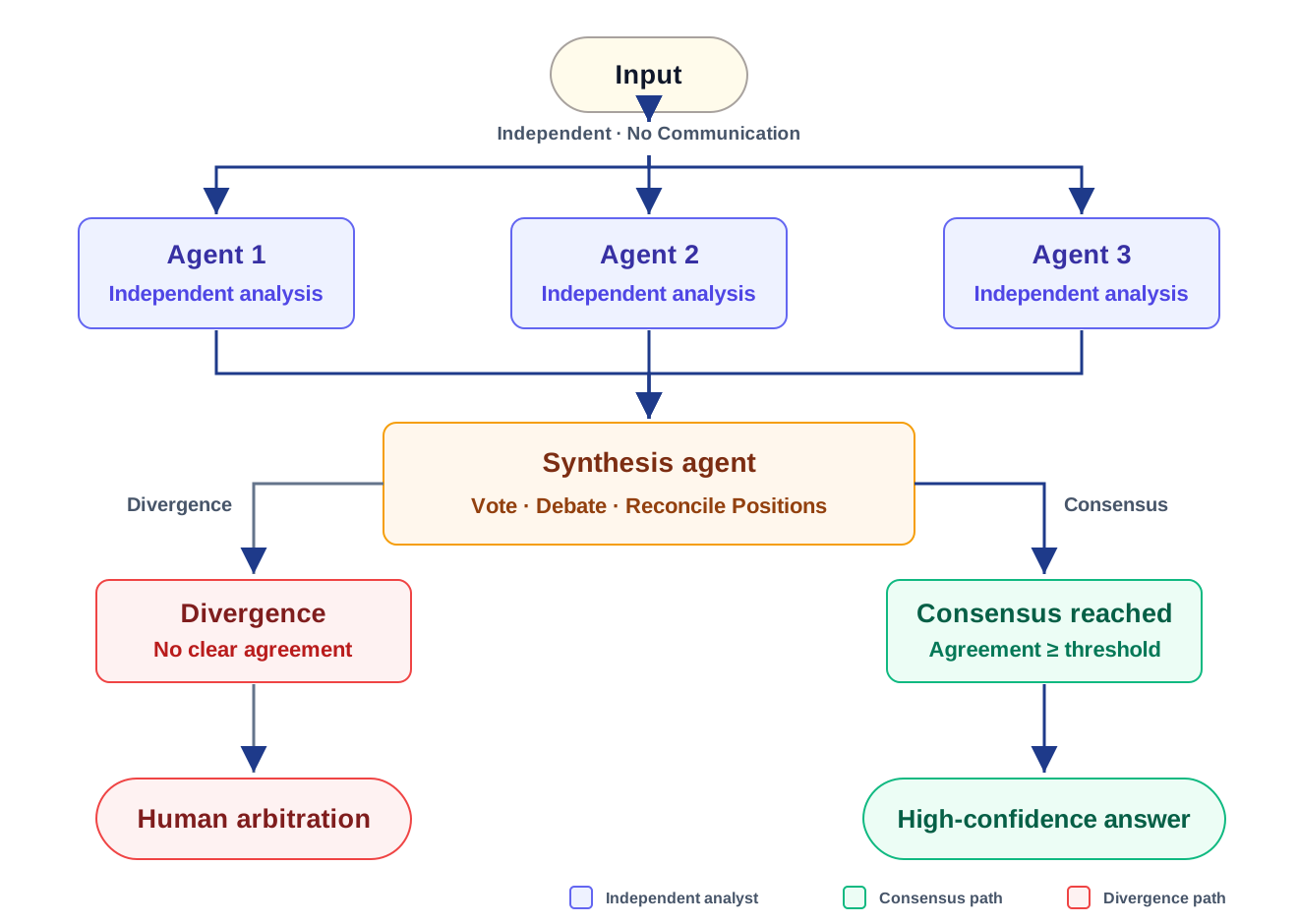
Multi-Agent Debate / Consensus
What it is: Multiple agents analyze the same problem independently, then compare positions and work toward a consensus or confidence score.
When to use it: I would reserve this for high-stakes decisions where disagreement itself is useful: credit risk, due diligence, clinical review, security analysis, or policy interpretation.
Enterprise benefits: It helps surface uncertainty. If the agents disagree, that is not just a failure; it may be the signal that a human needs to look.
Risks: It is expensive and it can create false confidence if the agents converge for the wrong reason. I would calibrate this carefully before allowing it to drive an automated decision.
Debate pattern: independent analysis to consensus
Tooling & Integration Patterns: Connecting AI to Real Systems
This is where agents stop being conversational and start touching real systems. The architecture has to treat tools, APIs, and retrieval layers as governed interfaces, not just convenient model extensions.
Tool-Using Agent (ReAct-style)
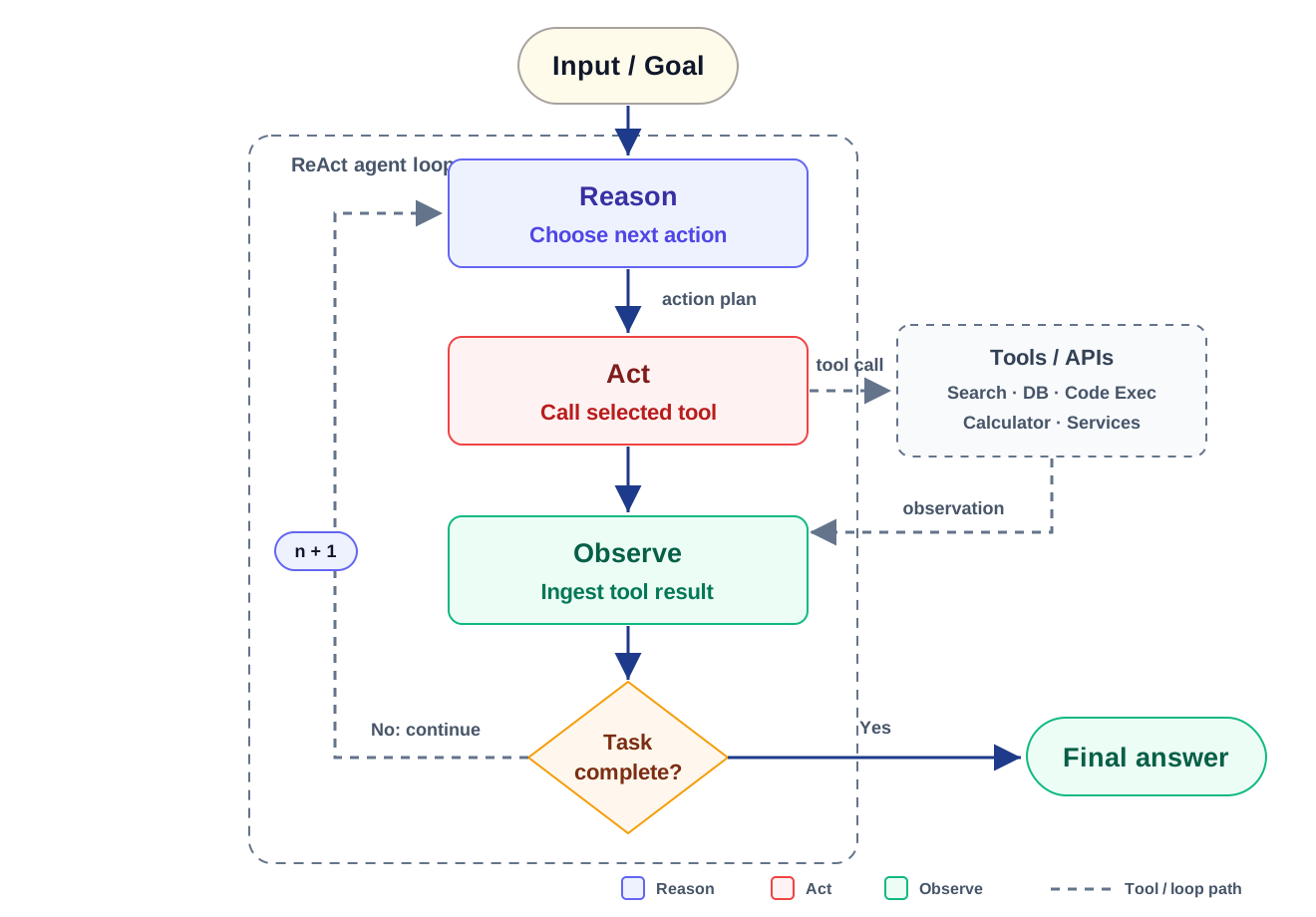
What it is: The agent reasons about what to do next, calls a tool, observes the result, and repeats until the task is done.
When to use it: This is common in enterprise copilots and process automation where the agent needs live data or needs to take action in another system.
Enterprise benefits: It turns the agent from a responder into an operator. It can look things up, update systems, trigger workflows, and use current enterprise data.
Risks: Tool access is the attack surface. I would be strict about least privilege, scoped credentials, and sanitizing tool outputs before they go back into the model context.
ReAct pattern: reason, call tools, observe, repeat
Retrieval-Augmented Agent (RAG-based)
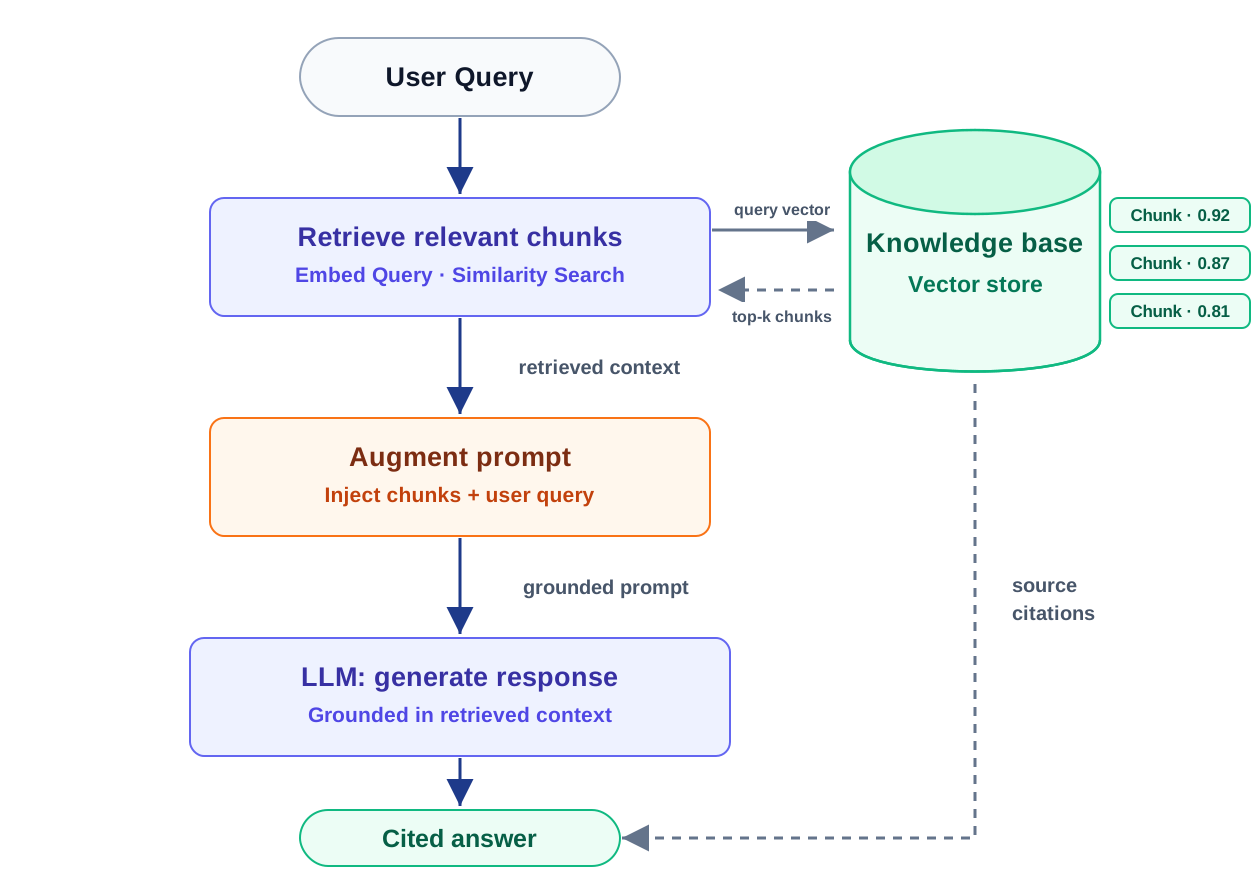
What it is: Before answering, the agent retrieves relevant enterprise knowledge and uses that context to ground the response.
When to use it: This is useful for policy Q&A, internal knowledge assistants, support copilots, and any workflow where the answer needs to come from approved enterprise sources.
Enterprise benefits: It gives the model something authoritative to work from and makes source attribution possible.
Risks: Most RAG failures are not model failures. They are retrieval, freshness, chunking, or access-control failures. If the wrong context is retrieved, the agent can still sound confident. I go deeper into these failure modes, and the hybrid, graph, agentic, and corrective patterns that address them, in From Retrieval to Trust: How Enterprise RAG Evolves in Production.
RAG pattern: retrieve enterprise context before generation
Memory & State Patterns: Continuity Across Interactions
Memory is where agent design gets personal and operational at the same time. It can make the experience much better, but it also creates retention, privacy, and governance questions very quickly.
Stateful / Memory-Augmented Agent
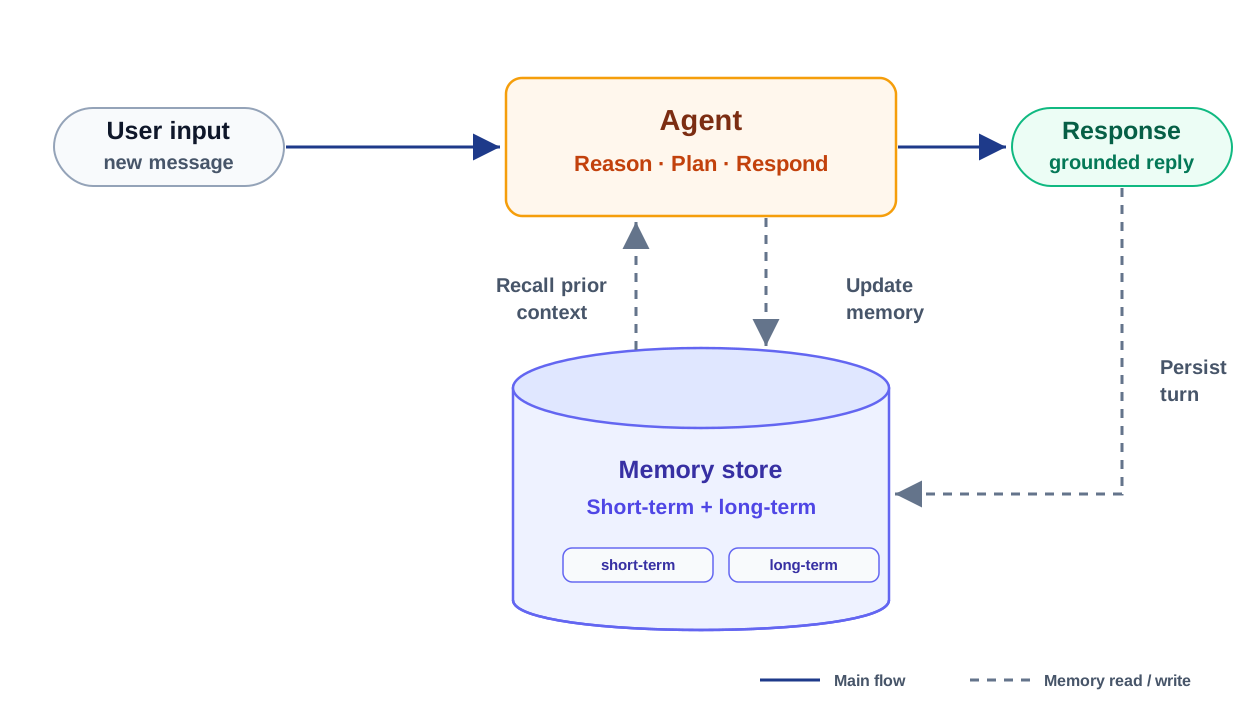
What it is: The agent remembers context across turns or sessions, either for the current workflow or for longer-term personalization.
When to use it: I would use this when continuity matters: long-running workflows, user preferences, prior decisions, or cases where making the user repeat context creates friction.
Enterprise benefits: It can make agents feel much more useful because they do not start from zero every time.
Risks: Memory can become a quiet PII store if no one governs it. The diagram shows recall and update, but the harder question is lifecycle management. I would define what can be remembered, for how long, who can access it, and how it gets deleted before putting this in production.
Memory pattern: recall, respond, and persist context
Human-in-the-Loop Patterns: The Non-Negotiable for Compliance
For some workflows, the right architecture is not full automation. It is controlled automation with a clear point where a human can approve, reject, or override the agent.
Human Approval / Escalation Loop
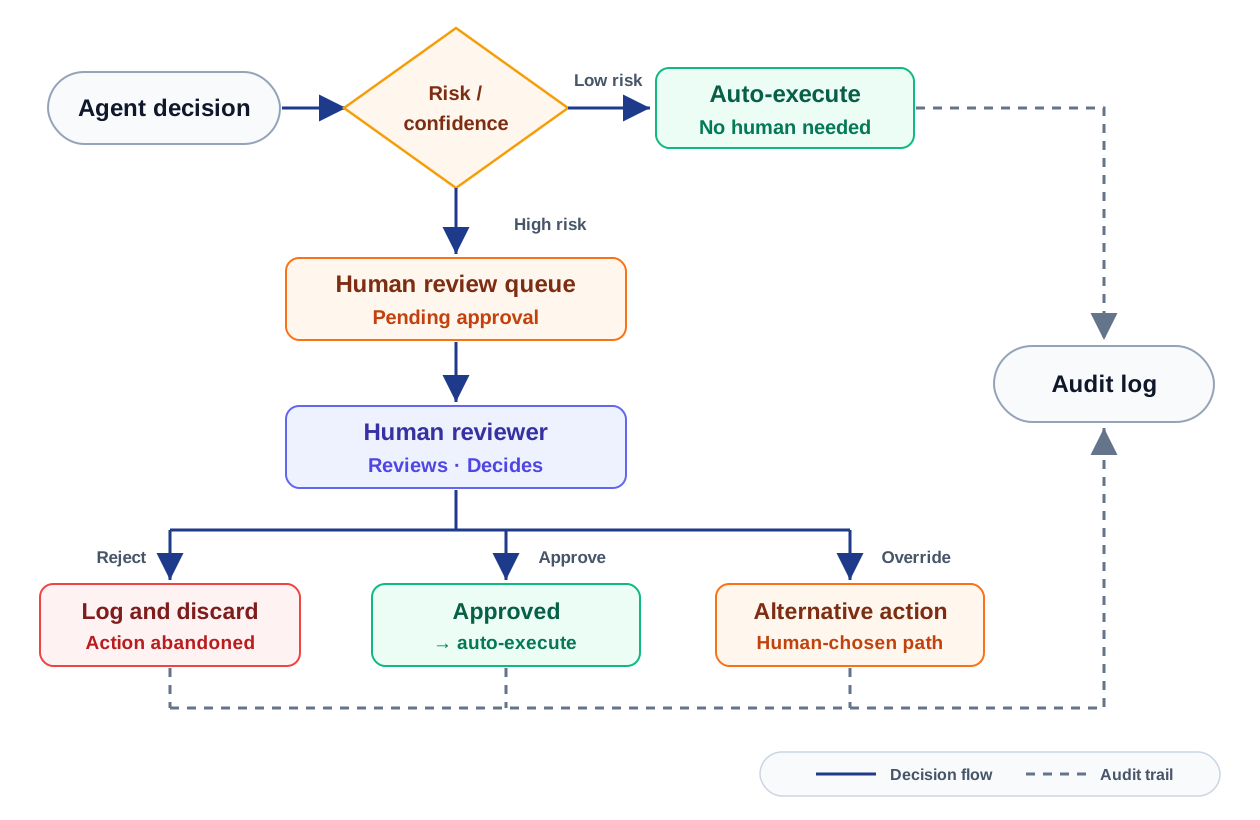
What it is: The agent can move routine work forward, but higher-risk decisions get routed to a human before execution.
When to use it: This is the pattern I would expect in finance, healthcare, legal, regulated operations, high-value approvals, or anything irreversible.
Enterprise benefits: It makes oversight explicit. The human decision becomes part of the workflow instead of happening informally in Slack, email, or after-the-fact review.
Risks: A bad review experience creates rubber-stamping. If the human does not have enough context to make a real decision, the approval gate is mostly theater. Accountability has to be clear before this goes live.
Human-in-the-loop pattern: risk-gated approval and audit
Hybrid Patterns: Where Production Systems Take Shape
No production system uses a single pattern for very long. Once the workflow touches real users, real systems, and real risk, the architecture usually becomes a composition. That is where these patterns stop being labels and start becoming design choices.
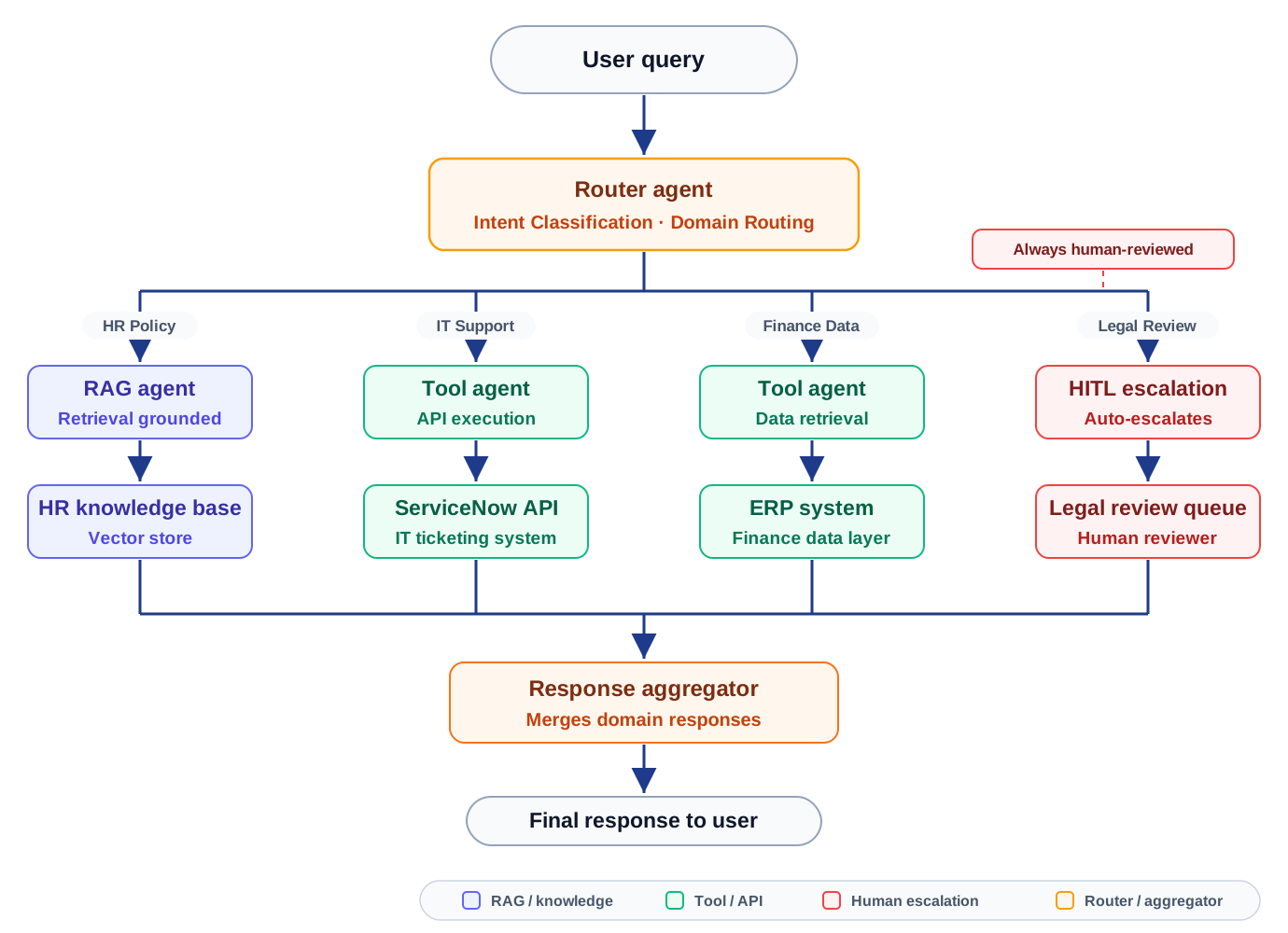
Router + RAG + Tool-Using Agent
Use case: Enterprise-wide AI assistant for HR, IT, Finance, and Legal queries.
Why it works: This is probably the most common enterprise shape. Users want one assistant, but the architecture cannot be one giant agent with access to everything. The router keeps the experience simple while the backend stays separated by domain. HR can use RAG over policy documents, IT can call a ticketing system, Finance can retrieve ERP data, and Legal can route to human review instead of pretending every question should be automated.
What I would watch: The hard part is not the front-end experience. It is permissioning, routing accuracy, and making sure each domain only gets the context and tools it should have.
Enterprise copilot hybrid: governed routing across domains
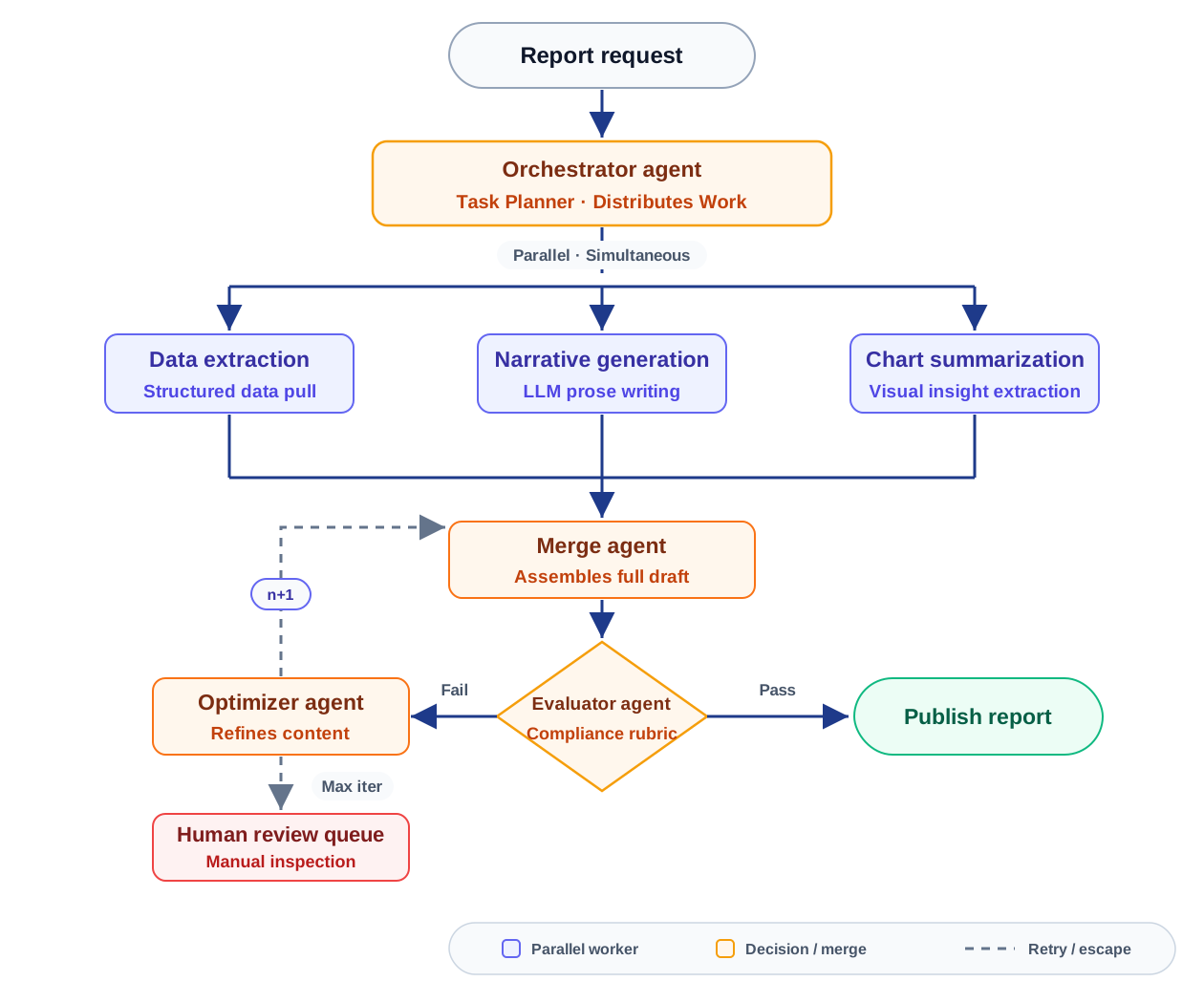
Orchestrator + Evaluator Loop
Use case: Automated financial report generation with compliance validation.
Why it works: This is the kind of workflow where orchestration and quality gates belong together. The orchestrator can split the work across data extraction, narrative drafting, and chart interpretation, but the evaluator is what keeps the output from becoming a polished but non-compliant draft. The human review path is important because some issues should not be solved by another retry.
What I would watch: The evaluator rubric has to be treated like a real control artifact. If the rubric is vague, the loop only creates the illusion of review.
Automated workflow hybrid: parallel drafting plus QA gate
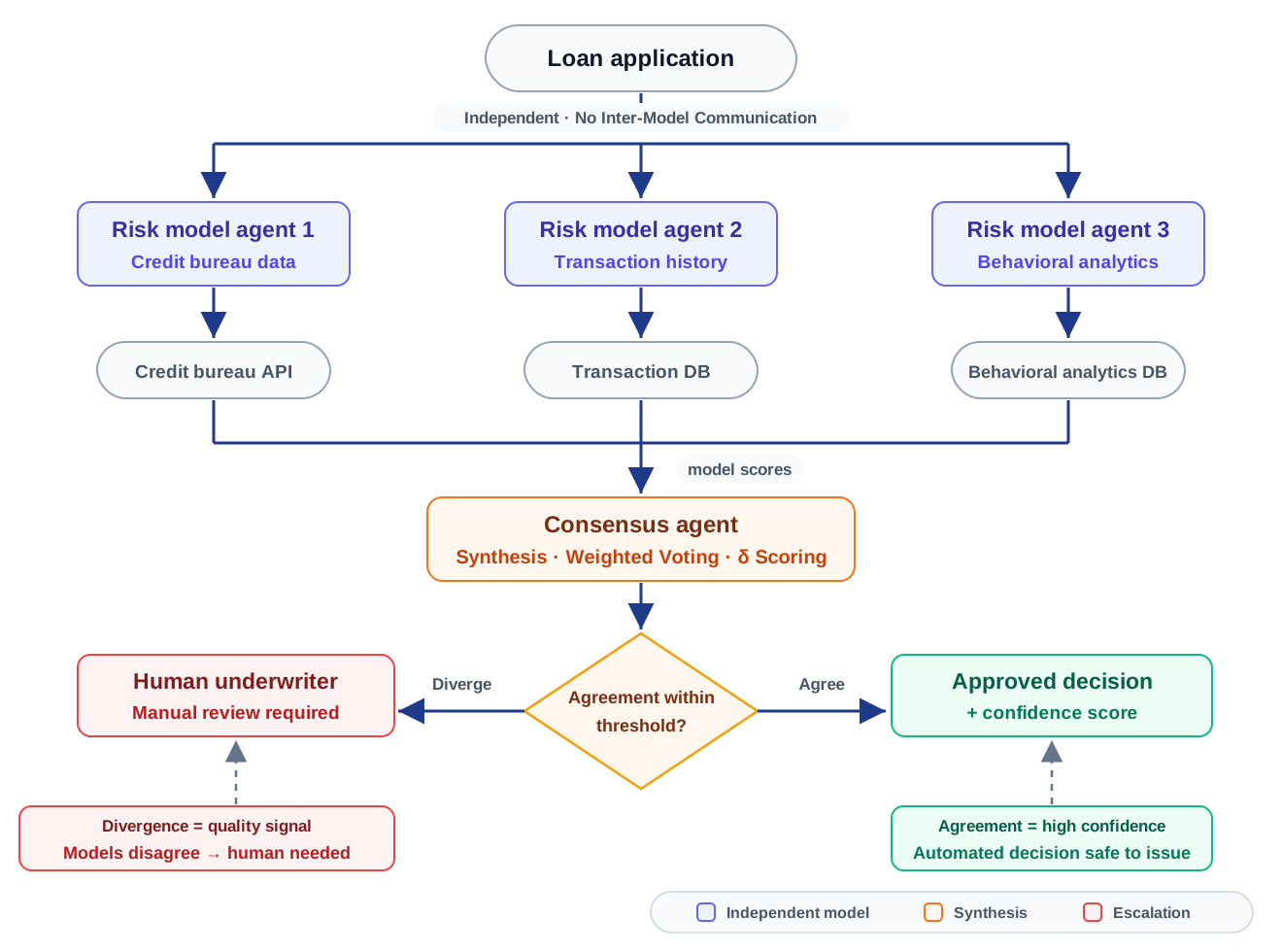
Parallel + Consensus
Use case: Credit risk assessment for loan underwriting.
Why it works: I would use this when the cost of a wrong automated decision is high enough that one model path is not enough. Independent agents can look at different evidence, scoring strategies, or risk dimensions, and the consensus layer turns agreement or disagreement into an explicit signal. The important part is that divergence does not get hidden; it becomes the reason to bring in a human.
What I would watch: Consensus can be misleading if all agents share the same blind spot. The architecture should preserve the reasoning behind each path, not just the final score.
Decision-system hybrid: consensus scoring with human fallback
The Architecture Question That Matters
The way I look at this is simple: agentic AI architecture is not about giving agents the maximum amount of autonomy. It is about deciding how much autonomy the workflow can safely handle. Some use cases only need a clean chain. Some need a router. Some need orchestration, evaluation, memory, and a human approval gate because the business risk is higher. That is the part architects have to be honest about. The right pattern is not always the most advanced one; it is the one that gives the team enough control, visibility, and accountability to trust the system when it leaves the demo environment.