Blog Post
Why AI Agents Forget: How to Design Memory That Works

The agent worked beautifully in the demo. Then real users showed up. Someone says, “I already told it this yesterday.” Another user says, “Why is it asking me the same question again?” A support lead opens the trace and sees the agent confidently responding without the one piece of context that would have changed the answer.
That is usually the moment the team starts blaming the model. Maybe the model is too small. Maybe the prompt needs more examples. Maybe the context window is not large enough. Maybe fine-tuning will fix it.
Sometimes those things help. But most of the time, the real problem is simpler and more uncomfortable: the agent was never designed to remember.
Large language models are stateless by default. They do not remember your last conversation, your prior decision, your customer’s history, or the workflow they completed yesterday unless the system explicitly brings that information back into context. A bigger context window can help for a while, but it is not the same thing as memory. It is just a larger temporary workspace.
If we want AI agents to behave with continuity, we have to design continuity into the architecture. This post is about that missing layer. It is the fourth pillar that sits alongside connection, knowledge, and action (see Beyond the Model: The 3 Pillars of AI Agents).
Why Agents Forget
Forgetting is not one problem, and that is what makes it tricky. When people say an AI agent is “forgetting,” they usually mean one of three things. It does not remember something from earlier in the same conversation. It does not remember something from a previous session. Or it does not remember how it solved a similar task before. Those sound like the same problem, but architecturally they are different.
Remembering an earlier turn in the same conversation is session continuity. Remembering a prior customer issue, previous analysis, or user preference is long-term memory. Remembering the method that worked last time is procedural memory. If we treat all of these as one generic “chat history” problem, the design starts to fall apart quickly.
Most early agent builds do exactly that. They append more transcript, retrieve a few documents, and hope the model figures out what matters. That can work in a demo. It does not hold up when the same agent has to support thousands of users, long-running workflows, role-based permissions, changing policies, and audit requirements.
The root issue is simple: the model is not the memory system. The model reasons over the information it can see. The product architecture decides what it gets to see.
Why Bigger Context Is Not Memory
This is where many teams take the wrong turn. It is tempting to solve forgetting by expanding the context window. If the model can read 100,000 tokens, why not just keep adding more history? There are three problems with that approach.
First, it gets expensive. Every extra token you carry forward becomes recurring cost and latency. In enterprise workflows, old context can become a tax paid on every interaction.
Second, more context does not mean better recall. Research on long-context models has shown that models can be weaker at using information buried in the middle of a long prompt than information near the beginning or end. This is often called the “lost in the middle” problem. The practical point is not that long context is bad. The point is that long context is not a retrieval strategy.
Third, a context window has no judgment. It does not know which facts are current, which ones are stale, which ones are sensitive, and which ones should be deleted. It is a workspace, not a memory architecture.
I think of long context like a bigger whiteboard. Useful, absolutely. But if nobody decides what belongs on the whiteboard, when to erase it, and where the durable record lives, the room still gets messy.
The Memory Layer an Agent Actually Needs
Once you stop treating memory as a prompt-size problem, the architecture becomes clearer. The better pattern is to design a memory layer around the model. In practice, that means introducing a component I like to call the Memory Orchestrator.
The Memory Orchestrator is not one specific product or framework. It is a responsibility in the architecture. It decides what to retrieve, what to write, what to summarize, what to ignore, and what the model is allowed to see for the current task.
Memory architecture: retrieve, write, prune, govern
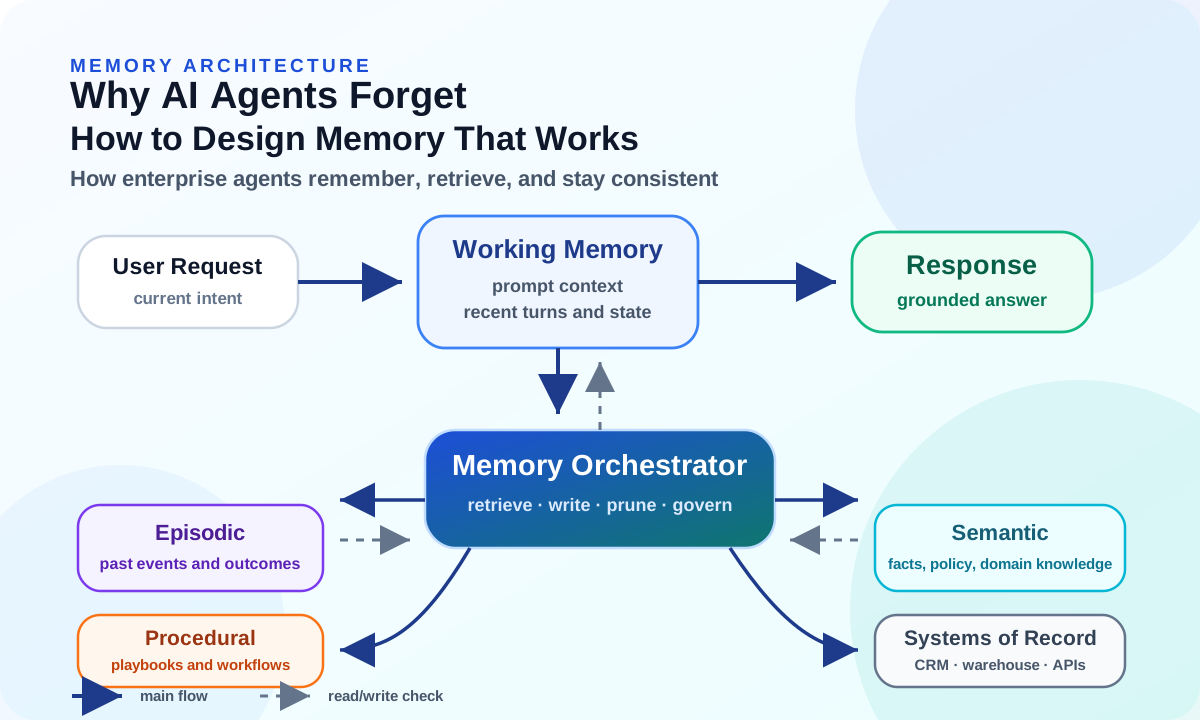
At a high level, the orchestrator sits between the user request, the model’s working context, and the external memory stores. For each turn or task, it asks:
- What does the agent need to know right now?
- Which memory store is the right source for that information?
- Is the retrieved memory still valid?
- Is the user or agent allowed to access it?
- Should anything from this interaction be written back for future use?
- Should older memory be summarized, corrected, archived, or deleted?
That is the difference between an agent that merely has a long prompt and an agent that behaves with continuity.
What Enterprise Agents Need to Remember
Enterprise memory is broader than most teams expect. It is not just chat history. A useful agent may need several types of memory, each with a different purpose.
| Memory Type | What It Stores | Enterprise Example |
|---|---|---|
| Working | Current task context, recent turns, active reasoning state. | The user's current request, the latest tool result, or the draft plan for this workflow. |
| Episodic | Past events and interactions. | Prior support tickets, previous analysis runs, or decisions made in earlier sessions. |
| Semantic | Stable facts and relationships. | Policies, product documentation, organization structure, and domain terminology. |
| Procedural | Reusable methods and workflows. | How to run month-end analysis, triage an incident, or validate a generated report. |
| System | Authoritative structured data. | CRM records, ERP data, data warehouse tables, ticket status, and entitlement rules. |
The one I see teams underuse is procedural memory. Most teams think about remembering facts. Fewer think about remembering methods.
But for agents, method matters. If the agent learned that a certain validation sequence catches bad invoice records, or that a specific escalation path works for a certain class of incident, that should not disappear after the task ends. It should become part of the agent’s reusable operating knowledge, with the right governance around it.
This is where memory starts to become more than personalization. It becomes operational maturity.
The Write-Manage-Read Loop
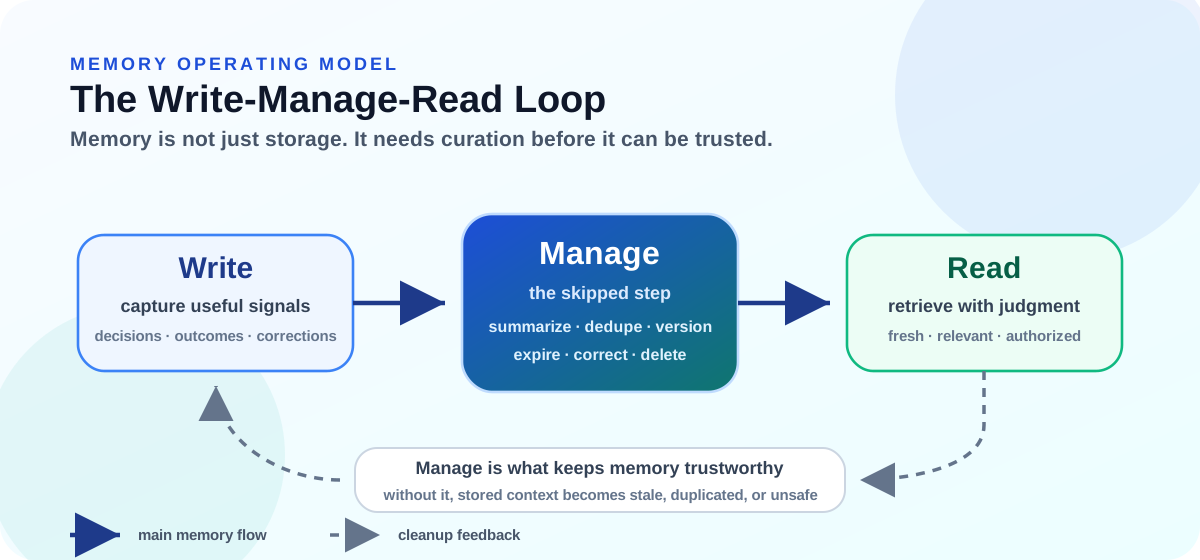
Once the memory types are clear, the next question is how they stay useful. This is the operating model I would want every agent team to understand before they build long-term memory. Most teams think memory is simple: save something, search for it later, and put it back into the prompt. That is a start, but it is not enough for production. A useful memory system needs three motions: Write, Manage, and Read.
Write-Manage-Read: the memory operating model
| Motion | What Happens | If It Is Skipped |
|---|---|---|
| Write | The agent captures useful signals: decisions, outcomes, corrections, preferences, and workflow results. | The agent does not improve across sessions because nothing durable is captured. |
| Manage | Memory gets summarized, deduplicated, versioned, corrected, expired, or deleted. | Memory slowly becomes stale, duplicated, contradictory, or unsafe. |
| Read | The orchestrator retrieves the right memory and injects only the useful part into working context. | The agent either misses important context or floods the model with irrelevant history. |
The important point is this: many memory failures are not write failures. The information may have been stored somewhere. The failure is that it was not managed well enough to be trusted later. This is where agent memory starts to look less like “chat history” and more like enterprise architecture. It needs ownership, lifecycle rules, reconciliation, and observability.
What Makes Memory Trustworthy
Memory is only valuable if the agent can trust it at the moment of use. That means the architecture cannot stop at storage. It has to answer four questions: where the memory lives, how it is retrieved, how it ages, and who is allowed to use it.
Where Memory Should Live
This is where architecture discipline matters. There is no single memory store that fits every need. A serious enterprise agent usually needs a combination, and the decision should be driven by what the agent is trying to remember.
| If the Agent Needs | Use | Why It Fits |
|---|---|---|
| Immediate task context | Context Window | Best for the current request, active plan, recent tool result, and only the history needed to reason well. |
| Similar documents, tickets, or policies | Vector Search | Useful for semantic recall, but it needs metadata, freshness rules, reranking, and access filters. |
| Relationships, ownership, or dependencies | Knowledge Graph | Better when the agent needs to reason over connected entities, approval paths, product hierarchies, or dependencies. |
| Exact and current facts | Systems of Record | Account status, inventory, entitlement, revenue, and policy version should come from authoritative sources. |
| Compressed prior sessions | Summaries | Helpful when raw transcripts are too noisy, but summaries need versioning and review because nuance can drift. |
This is the enterprise distinction I would not compromise on: memory is not the source of truth. Memory is usually a derived view of something else: a conversation, a ticket, a policy, a CRM record, a warehouse query, or a workflow result. For load-bearing facts, memory should help the agent know what to look for, but the system of record should confirm what is currently true. Caches need invalidation. Replicas need freshness checks. Agent memory needs the same mindset.
Retrieval Is Where Memory Succeeds or Fails
Memory only feels intelligent when retrieval works. Storing memory is the easy part. Getting the right memory back at the right time is the hard part.
Most failures happen in one of two ways. Retrieval is too broad, so the agent floods the prompt with maybe-relevant context and becomes confidently wrong. Or retrieval is too narrow, so it misses the one prior decision, policy exception, or workflow outcome that mattered. From the user’s side, both feel like forgetting.
Good retrieval usually combines semantic similarity, metadata filters, recency, authority scoring, structured lookup, and reranking before anything reaches the prompt. It also needs observability. If you cannot see what memory was retrieved and why, debugging agent behavior becomes guesswork. That retrieval layer is effectively RAG, and it has its own progression from basic to production-grade; I cover that separately in From Retrieval to Trust: How Enterprise RAG Evolves in Production.
Memory Needs a Lifecycle
Memory ages. If we do not design for that, the agent eventually starts trusting yesterday’s truth as if it were still current. A stale policy can create compliance risk. An outdated customer preference can create a bad experience. A low-quality summary can quietly poison future decisions. So memory cannot be just read and write. It also needs update, expire, correct, and delete. Forgetting is not always a bug. Sometimes it is a requirement. Good memory architecture includes selective forgetting by design.
Memory Is Also a Security Surface
The moment memory persists, it stops being just a product feature. A bad memory write can shape future behavior. A sensitive detail stored in the wrong place can become a privacy problem. In multi-agent systems, one agent’s memory can even influence another agent if boundaries are loose. That is why memory needs provenance for every write, filtering before sensitive data enters long-term memory, access controls on shared memory, and a way for users or administrators to correct bad memory. If the agent can remember something, the enterprise needs a way to govern that memory.
Architect’s Checklist
This is the checklist I would use before trusting an agent with real enterprise work. The better pattern is to make each memory decision explicit instead of hoping the model sorts it out later.
| Common Mistake | Better Pattern |
|---|---|
| Relying only on the context window | Separate working memory from durable memory, and retrieve prior context only when it helps the current task. |
| Storing raw transcripts as memory | Store decisions, facts, outcomes, preferences, and summaries. Keep raw logs for audit, not as the main reasoning memory. |
| Using one retrieval method for everything | Match retrieval to the memory type: semantic search for documents, structured lookup for facts, graph traversal for relationships. |
| Never pruning or correcting memory | Add expiration, versioning, conflict resolution, correction, and deletion workflows from the start. |
| Ignoring access control | Use namespaces, permissions, provenance, and audit trails for memory reads and writes. |
| Treating memory as personalization only | Use memory to improve reliability, governance, repeatability, and workflow continuity, not just tone preferences. |
If I were reviewing an enterprise agent design, I would still ask a few direct questions before calling it production-ready. What should the agent remember, and what should it intentionally forget? How do we know the right memory was retrieved? When does the agent save something new? Who can access which memory, and can we inspect every read and write in the trace?
If those questions do not have clear answers, the agent may still work in a demo. But it will likely feel inconsistent in production.
The Practical Takeaway
The future of enterprise agents is not just bigger models and larger context windows. Those help, but they do not replace memory architecture. Reliable agents need a designed memory layer: one that knows what to remember, where to store it, when to retrieve it, when to forget it, and how to govern it.
For enterprise architects, the question is not, “How much context can the model hold?” The better question is, “What memory does this workflow need, and how will we manage it safely?” The model does not suddenly remember on its own. The architecture remembers, retrieves, checks, and supplies the model with the right working context. That is the difference between an agent that works in a demo and one that can carry enterprise work over time.
Further reading: Lost in the Middle is a useful paper for understanding why long context does not automatically mean reliable recall. MemGPT is also worth reading for the operating-system-inspired view of memory tiers and virtual context management.